


Deployment on-prem · Data Anda tetap aman di jaringan Anda



Ikuti kami di LinkedIn
Hubungi Pakar


Lanskap ancaman saat ini
90%
kerentanan terjadi saat tahap coding dan build
33%
dari semua serangan yang mencapai production menargetkan aplikasi web
60%
uji penetrasi berhasil masuk melalui aplikasi web
Sumber: PT SWARM penetration testing reports, H2 2024 — Q3 2025
Platform Akurasi Tinggi untuk Membentengi Kode Anda
Temukan risiko nyata tanpa kebisingan

Apa itu Application Inspector?
Alat AppSec yang menggabungkan SAST, SCA, dan DAST dalam satu platform — ditambah deteksi malicious code berbasis ML dan deteksi secrets di dalam kode. Memindai kode sumber dan pustaka open-source, mengonfirmasi apa yang benar-benar dapat dieksploitasi, dan membantu tim keamanan serta pengembangan fokus pada daftar risiko nyata yang dapat ditindaklanjuti.
Quality Gates — Pengambilan keputusan otomatis
Cakupan penuh OWASP Top 10
Sistem CI/CD terintegrasi out-of-the-box
Malicious code & secrets
ditemukan dengan analisis ML dan aliran data (data flow), bukan signature
Apa yang Application Inspector lakukan untuk tim Anda
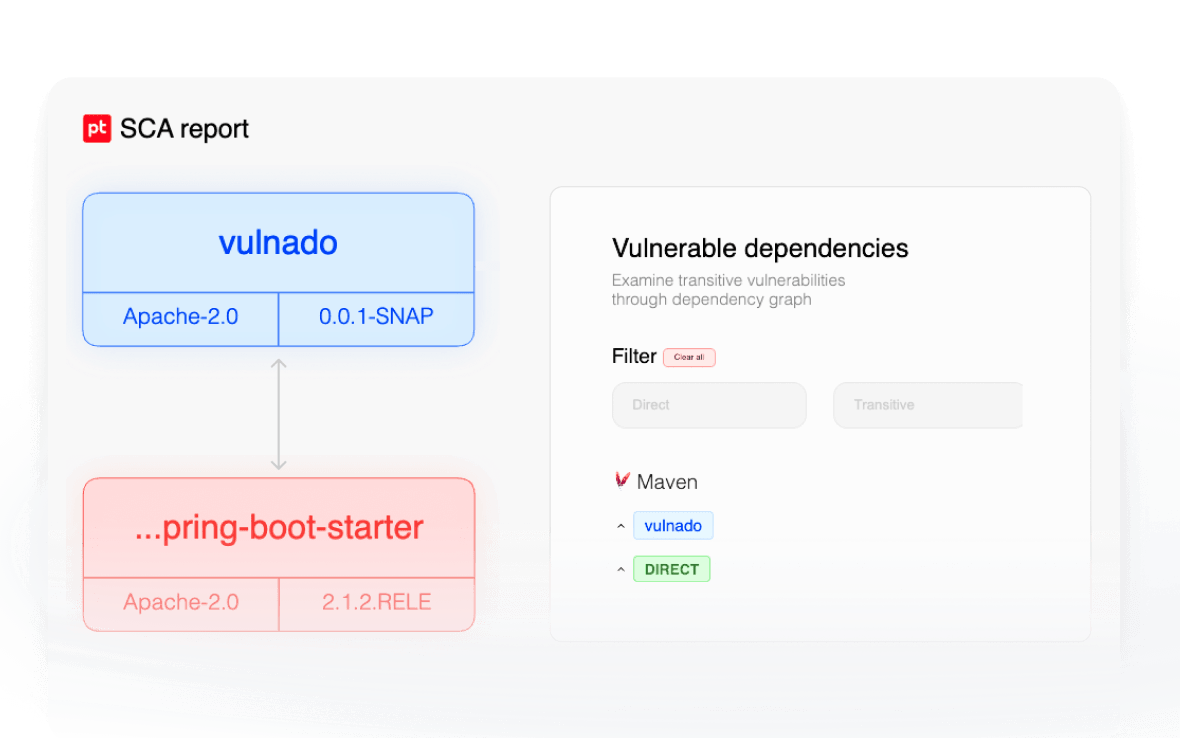
Hasilkan software bill of materials (SBOM) secara lengkap dan lihat dengan jelas komponen open-source mana yang menciptakan risiko nyata di aplikasi Anda.
Lihat setiap dependensi — dan apa yang tersembunyi di dalamnya

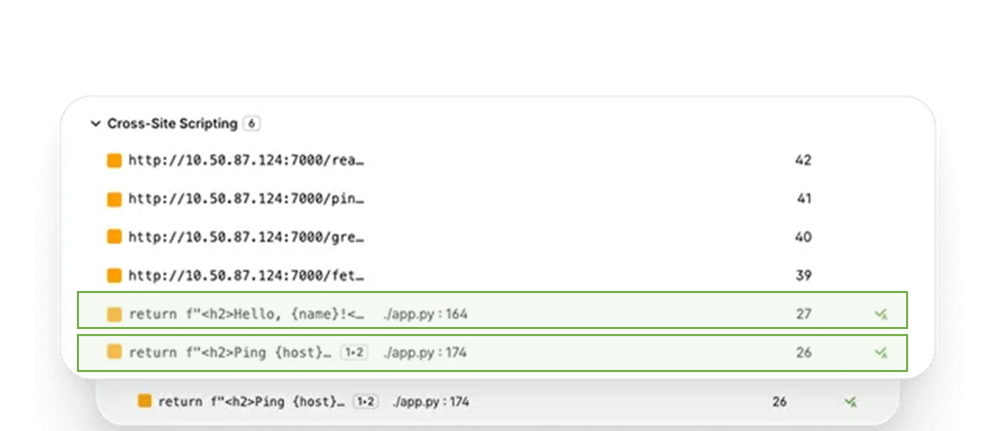
Perbaiki masalah nyata, hindari false positive
Analisis cerdas menghilangkan peringatan yang tidak perlu sehingga tim Anda hanya memperbaiki masalah nyata.
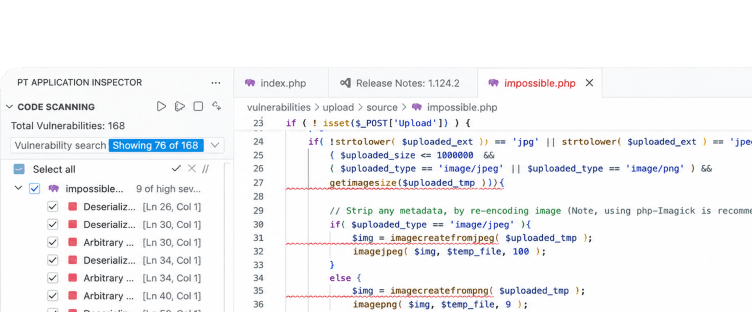
Integrasi lokal pada IDE Anda
Hasil temuan dan panduan perbaikan muncul langsung di VS Code, Visual Studio, dan JetBrains — termasuk password, API key, dan token yang tertanam di kode, tertangkap sebelum sampai ke repositori.

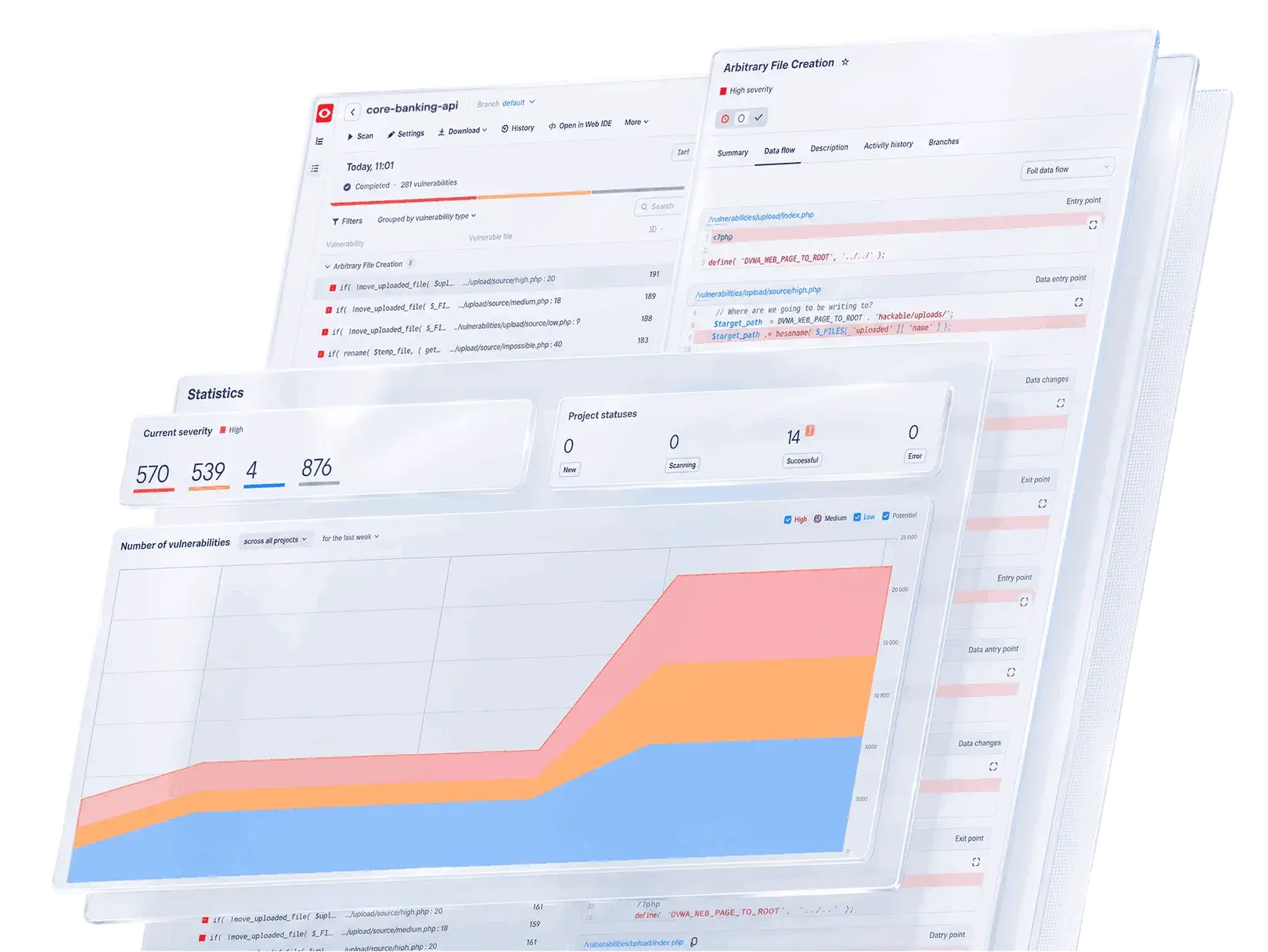
Fokuskan prioritas berdasarkan risiko bisnis
Tetapkan aturan keamanan Anda sendiri dan fokus pada apa yang berdampak pada bisnis Anda dan tidak berdasarkan skor keparahan generik.


Lihat setiap dependensi — dan apa yang tersembunyi di dalamnya
Hasilkan software bill of materials (SBOM) secara lengkap, lihat komponen open-source mana yang menciptakan risiko nyata — dan tangkap malicious code yang ditanam di dalam paket: backdoor, eksekusi tersembunyi, eksfiltrasi data. Analisis ML, bukan signature.
Perbaiki masalah nyata, hindari false positive
Analisis cerdas menghilangkan peringatan yang tidak perlu sehingga tim Anda hanya memperbaiki masalah nyata.
Integrasi lokal pada IDE Anda
Hasil temuan dan panduan perbaikan muncul langsung di VS Code, Visual Studio, dan JetBrains — termasuk password, API key, dan token yang tertanam di kode, tertangkap sebelum sampai ke repositori.
Fokuskan prioritas berdasarkan risiko bisnis
Tetapkan aturan keamanan Anda sendiri dan fokus pada apa yang berdampak pada bisnis Anda dan tidak berdasarkan skor keparahan generik.
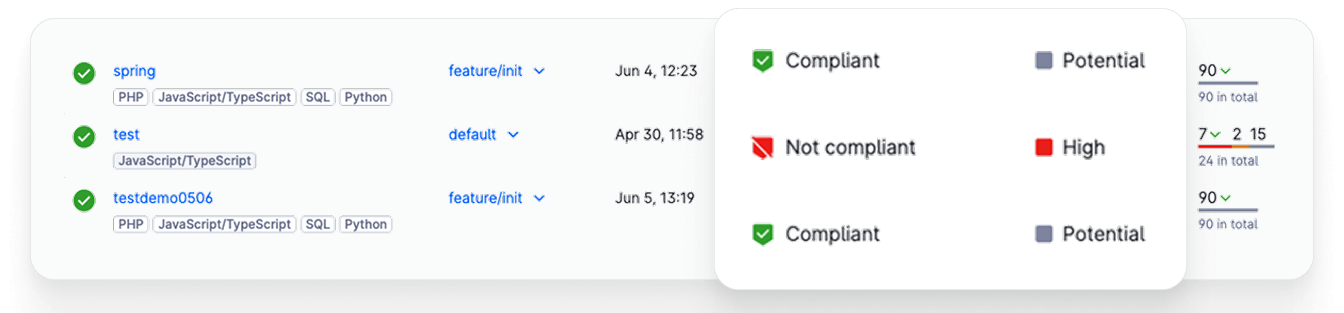

Empat cara integrasi — pilih yang sesuai dengan workflow Anda

Pemindaian file, folder, dan arsip secara individual
Application Inspector bekerja sebagai analyzer mandiri dan sehingga dapat langsung beroperasi tanpa membutuhkan integrasi. Upload file, folder proyek, atau arsip ZIP secara langsung dan dapatkan laporan keamanan lengkap dalam hitungan menit. Cocok untuk audit satu kali, review kode pihak ketiga, atau pemeriksaan cepat sebelum rilis.

Koneksi langsung ke repositori Git Anda
Hubungkan Application Inspector ke repositori Git mana pun melalui HTTPS atau SSH. Pindai branch, tag, atau commit tertentu tanpa upload manual, dan jalankan ulang analisis di setiap revisi baru. Kompatibel dengan GitHub, GitLab, Bitbucket, dan server Git yang dihosting sendiri.

Plugin bawaan untuk pipeline CI/CD Anda
Tambahkan pemeriksaan kerentanan di setiap build. Plugin siap pakai untuk GitLab CI, GitHub Actions, Jenkins, dan Azure DevOps berjalan di setiap pipeline trigger, memblokir build dengan kerentanan kritis, dan memposting hasil kembali ke dashboard Anda.

Pindai kode langsung di IDE Anda
Tangkap kerentanan saat kode ditulis. Ekstensi native untuk Visual Studio Code, Visual Studio, dan JetBrains IDEs (IntelliJ IDEA, PyCharm, WebStorm, GoLand, dan lainnya) memberikan temuan inline, panduan perbaikan, dan navigasi satu klik ke baris yang terpengaruh tanpa meninggalkan editor.
Dapatkan Strategi DevSecOps 2026 secara gratis
Ingin mempercepat proses rilis tanpa mengorbankan keamanan? Kami telah menganalisis pipeline di e-commerce, fintech, dan logistik digital dan mempercepat time-to-market mereka sekaligus mengurangi risiko kerentanan hingga 60%.
Tinggalkan kontak Anda untuk mendapatkan strategi yang disesuaikan dengan bisnis Anda.
Tinggalkan kontak Anda untuk mendapatkan strategi yang disesuaikan dengan bisnis Anda.
Saya menyetujui pemrosesan data pribadi saya sesuai dengan ketentuan Kebijakan Privasi.
Сообщение об успешной отправке!
Integrasikan Application Inspector pada workflow Anda
Hubungkan sumber/repository Anda, jalankan analisa cerdas, dan langsung dapatkan hasil analisa pada tools tim Anda.


Apa yang dilakukan Application Inspector
Kami tidak hanya menunjukkan kerentanan kepada Anda.
Kami menunjukkan mana yang benar-benar penting.
Kami menunjukkan mana yang benar-benar penting.
Pindai kode & pustaka open-source Anda (SAST/SCA)
Tangkap masalah sebelum mencapai produksi. Temukan risiko tersembunyi di komponen pihak ketiga.
Konfirmasi kerentanan nyata secara otomatis (AutoCheck)
Tidak perlu verifikasi manual. Hanya risiko nyata yang dapat dieksploitasi yang sampai ke tim Anda.
Integrasi dengan CI/CD Anda
Keamanan yang tidak mengganggu alur kerja Anda.
Quality gates spesifik per aplikasi
Otomatiskan keputusan deployment. Blokir hanya yang penting.
Langsung gunakan di IDE Anda di VS Code, IntelliJ, Visual Studio
Pengembang memperbaiki masalah tanpa pernah meninggalkan editor.
Apa yang Anda dapatkan

Tim Anda fokus pada risiko nyata dengan 2× lebih sedikit false positive dalam mendeteksi kerentanan
Plugin IDE & CI/CD siap pakai
tidak perlu proses setup yang panjang
AutoCheck mengonfirmasi apa yang dapat dieksploitasi
secara otomatis, dengan bukti yang terlampir
SAST/SCA + DAST dalam satu alat
ditambah deteksi malicious code berbasis ML dan deteksi secrets di dalam kode: empat jenis risiko, satu alat.

23+
tahun R&D di keamanan siber
4,000+
pelanggan enterprise di seluruh dunia
2,600+
spesialis keamanan
31k+
kerentanan ditemukan di sistem korporat setiap tahun
Pemimpin industri dalam keamanan siber berbasis hasil
Positive Technologies adalah penyedia produk dan solusi keamanan informasi global terkemuka. Misi kami adalah melindungi bisnis dan seluruh industri dari ancaman serangan siber.
Vendor global yang mencakup hampir semua benua dan kawasan, termasuk Asia Tenggara, MENA, LATAM, India, dll.
Kasus Klien
Pengujian Keamanan Lebih Cepat dengan Lebih Sedikit False Positive

"PT Application Inspector telah menjadi bagian integral dari program pengujian keamanan kami untuk puluhan aplikasi web. Alat ini menyaring false positive dan hasil yang tidak relevan, sehingga kami dapat mengoptimalkan proses AST dan fokus pada ancaman nyata — bukan mencarinya seperti jarum dalam tumpukan jerami."
Juergen Streit
Direktur Keamanan IT Worldwide
Tech Data
Mempercepat Pengiriman Perangkat Lunak yang Aman
"Dengan 90% layanan kami yang bersifat digital, keamanan tidak boleh menghambat kami. PT Application Inspector memastikan deteksi kerentanan yang akurat, hampir menghilangkan false positive, dan berkat incremental scanning — kami merilis lebih cepat tanpa mengorbankan keamanan."
Ilya Zuev
VP Keamanan Informasi
Bank Digital Terkemuka
Visibilitas Jelas terhadap Risiko Keamanan Nyata
"Ini memberi tim kami pandangan yang lebih jelas tentang di mana risiko nyata berada."
Omar Nuseibeh
Kepala Layanan Digital
Arab Islamic Bank
Mengaktifkan DevSecOps tanpa Menghambat Inovasi
"Berkat solusi SAST & DAST komprehensif dari Positive Technologies, kami mempertahankan kecepatan go-to-market untuk layanan baru. Kami juga berhasil membangun kolaborasi yang efektif antara tim pengembangan dan keamanan, sekaligus memastikan perlindungan kuat untuk aplikasi yang sudah ada maupun yang sedang dikembangkan."
Dmitry Kostikov
Kepala Keamanan Informasi
Grup Layanan Keuangan Terkemuka
Mengamankan E-Banking tanpa Memperlambat Pengiriman
"Standar pengembangan e-banking di perusahaan kami sangat ketat, terutama dalam hal kualitas kode, deteksi kerentanan, dan kecepatan remediasi. Di saat yang sama, kami harus memastikan setiap pembaruan e-banking dapat dirilis tepat waktu tanpa menimbulkan kesalahan baru. PT Application Inspector terbukti menjadi solusi yang kami butuhkan—mengoptimalkan proses Application Security Testing (AST) sehingga kami tidak perlu lagi memilih antara keamanan yang kuat dan time-to-market yang cepat."
Direktur Keamanan Informasi
Bank Komersial Terkemuka
Memperkuat Pertahanan Siber melalui Simulasi Dunia Nyata
"Infrastruktur simulasi kota ini sangat detail dan realistis, memberikan lingkungan yang kuat bagi tim kami untuk terlibat dalam cyberbattle. Ini menambahkan dimensi praktis pada kompetisi yang sekaligus menantang dan mendidik."
Nur Qurratu Aini Rohizan
Analis
MyCERT — CyberSecurity Malaysia
Minta Demo
Tim kami akan menghubungi Anda dalam satu hari kerja dengan rencana pilot yang dirancang sesuai kebutuhan Anda.
Saya menyetujui pemrosesan data pribadi saya sesuai dengan ketentuan Kebijakan Privasi.
Atau hubungi kami langsung melalui info@positech.id (tim lokal untuk Indonesia & SEA).
Сообщение об успешной отправке!
Pertanyaan yang sering diajukan
Apa bedanya Application Inspector dengan pemindai keamanan lainnya?
Application Inspector menggabungkan kemampuan SAST + SCA + DAST dalam satu alat, ditambah deteksi malicious code berbasis ML dan deteksi secrets di dalam kode, secara otomatis memverifikasi kerentanan nyata dengan AutoCheck, dan memberikan jauh lebih sedikit false alarm dibandingkan alat yang hanya mengandalkan pencocokan pola.
Bisakah Application Inspector memindai pustaka open-source?
Ya. Application Inspector menyertakan Software Composition Analysis (SCA). Kami menunjukkan pustaka mana yang benar-benar menciptakan risiko nyata di aplikasi Anda.
Seberapa akurat Application Inspector?
Application Inspector menggunakan symbolic analysis dan tidak hanya mengandalkan pencocokan pola. Ini berarti jauh lebih sedikit false positive, hingga 2x lebih rendah dalam riset kami.
Bisakah pengembang menggunakan Application Inspector langsung di IDE mereka?
Ya. Kami menyediakan plugin native untuk VS Code, JetBrains IDEs (IntelliJ IDEA, PyCharm, WebStorm, GoLand, dan lainnya), serta Visual Studio.
Apakah data saya aman selama pilot?
Ya. Anda dapat menjalankan pilot sepenuhnya di lingkungan Anda sendiri (on-prem atau private cloud). Kode sumber Anda selalu berada di bawah kendali Anda.
Apakah Application Inspector memperlambat pipeline CI/CD Anda?
Tidak. Dengan pemindaian delta dan inkremental, hanya kode yang berubah yang dianalisis ulang. Anda dapat mengatur quality gates untuk memblokir hanya pada masalah kritis, sehingga temuan non-kritis tidak pernah menunda build Anda.
Bahasa pemrograman apa yang didukung?
C/C++, C#, Go, Java, JavaScript, TypeScript, Kotlin, Objective-C, Python, PHP, Ruby, Scala, Solidity, Swift, SQL, dan ratusan framework yang dibangun di atasnya. Deteksi malicious code saat ini mencakup Python, JavaScript, dan TypeScript; analisis lainnya mencakup seluruh daftar di atas.
Bisakah Application Inspector mendeteksi malicious code, bukan hanya kerentanan?
Ya. Kerentanan adalah kesalahan; malicious code adalah niat. Analyzer berbasis ML kami mencari logika yang sengaja ditanam — backdoor, eksekusi kode tersembunyi, eksfiltrasi data, obfuscation, loader, dan aktivitas cryptominer — perilaku yang masuk melalui dependensi open-source, hasil kerja kontraktor, dan rantai pasok perangkat lunak, dan yang tidak dirancang untuk ditemukan oleh alat berbasis signature. Pada benchmark terbuka OMCBench, modul ini mencapai kualitas deteksi 94%, dengan F1 +15% dan precision +40% dibandingkan pendekatan berbasis signature.
Apakah analisis ML mengirim kode saya ke LLM atau ke cloud?
Tidak. Model berjalan secara lokal di CPU standar — tanpa LLM, tanpa GPU, dan tanpa layanan eksternal. Kode sumber Anda tidak pernah meninggalkan infrastruktur Anda, sehingga kemampuan ini bekerja di dalam deployment on-prem dan tidak menimbulkan pertanyaan baru soal transfer data pribadi menurut UU PDP.
Bagaimana Application Inspector menemukan secrets di dalam kode?
Melalui analisis aliran data (data flow) dan entropi, bukan signature. Kami tidak sekadar mencocokkan string yang terlihat seperti kunci — kami melacak dari mana secret berasal, ke mana ia diteruskan, dan di mana ia benar-benar digunakan. Secret yang sampai ke pemanggilan sensitif dilaporkan sebagai risiko nyata, sehingga jauh lebih sedikit "secret" palsu yang harus ditriage tim Anda.


Cookies help us improve the user experience on our site. By continuing to use the site, you consent to the use of cookies and the processing of your data. More details can be found via the link